Transcription for Content Creators: Frequently Asked Questions
Many of 1bit.ai's users are content creators, educators, podcasters, and researchers who need to turn audio and video into accurate text—whether for YouTube captions, interview notes, or repurposing long-form content. If you're looking for a free YouTube transcript, podcast-to-text workflow, or interview transcription without the hassle, here are the most frequently asked questions:
How do I get a transcript from a YouTube video for free?
Paste the YouTube video URL into 1bit.ai's transcription tool. You don't need to download the video. Our AI processes the audio and returns a full transcript in seconds. You can export it as plain text, SRT, VTT, PDF, DOCX, or CSV (with or without timestamps). Free credits are included for new users.
Get YouTube transcript free →Can I transcribe podcasts and interviews to text?
Yes. Upload your podcast episode (MP3, M4A, WAV, etc.) or paste a link from Spotify, Apple Podcasts, or an RSS feed. The same applies to interview recordings—upload the file or paste a direct audio/video link. Speaker identification helps separate different voices in the transcript.
Try podcast & interview transcription →What export formats are available?
You can export transcripts as TXT, SRT, VTT, PDF, DOCX, or CSV. For PDF and DOCX you can choose with or without timestamps. SRT and VTT are ideal for subtitles and video captions; CSV is useful for spreadsheets and analysis.
Does 1bit.ai support multiple languages?
Yes. We support 100+ languages for both transcription and translation. You can transcribe in the original language and optionally translate the output into another language in one go.
How long does it take to transcribe a file?
Processing time depends on file length and server load.
Can I use this for Zoom or Google Meet recordings?
Yes. Upload your Zoom or Google Meet recording file (e.g. MP4, M4A), or paste a link if you have a direct URL. You get a timestamped transcript with speaker labels, which you can export as SRT, VTT, or document formats.
Transcribe meeting recordings →Do I need to install any software?
No. 1bit.ai runs in your browser. Upload files or paste YouTube/Vimeo/Instagram links—no desktop app or plugin required.
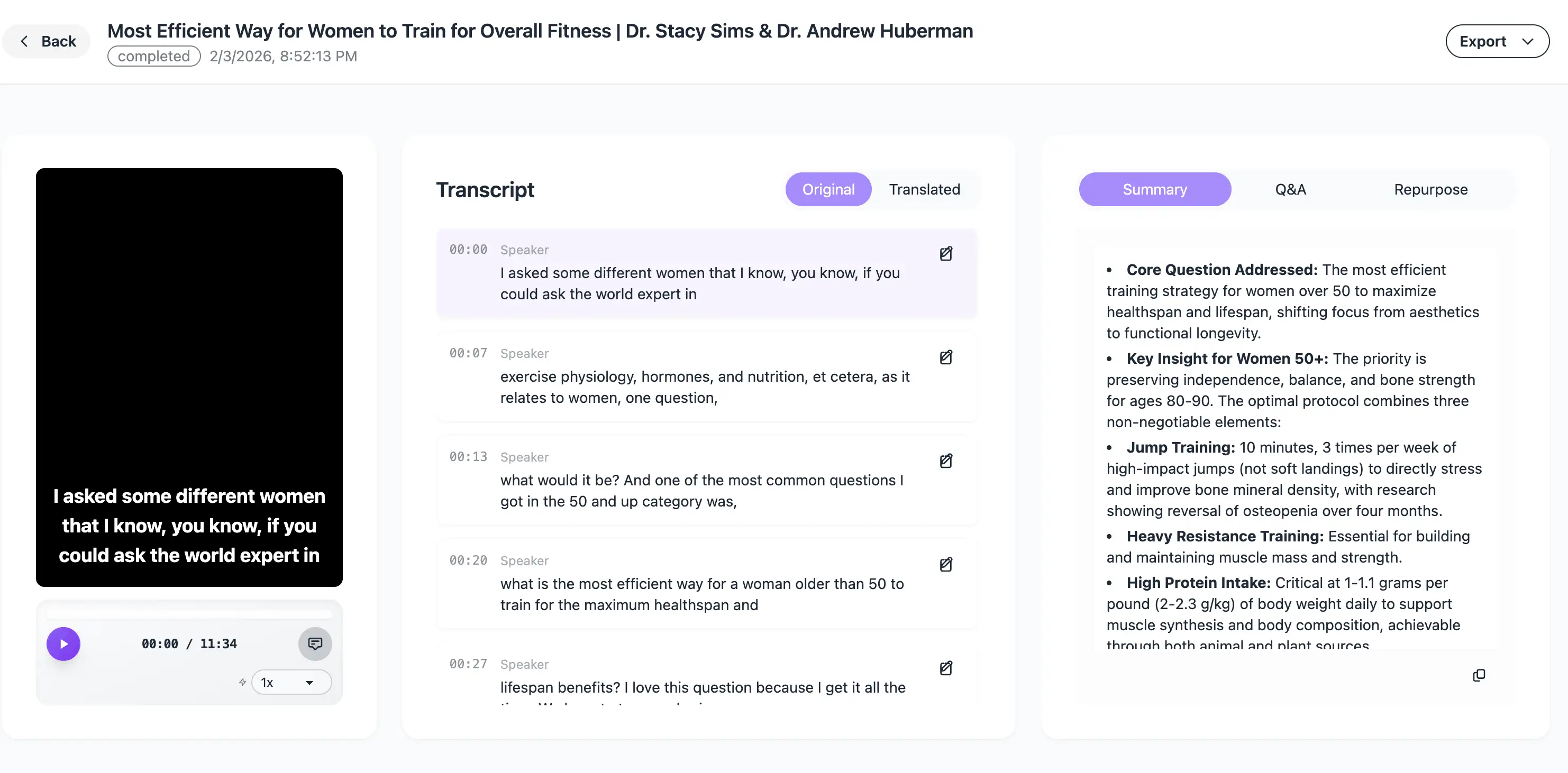
Is there a demo or example I can see?
You can try a live demo on our site to see the transcription interface and export options in action.
 Open live demo →
I have more questions.
If you have other questions about transcription, export formats, or workflows, reach out through our contact or support channels—we're happy to help. Email: support@1bit.ai
About 1bit.ai
1bit.ai converts audio and video to accurate text in seconds, powered by AI. Upload files or paste links to get transcripts, subtitles, and translations in 100+ languages.
Learn more about 1bit.ai transcriptionReady to start transcribing?
- ✓ Multiple formats — MP3, MP4, WAV, M4A, FLAC, OGG, WebM, MOV, AVI, and YouTube/Vimeo/Instagram URLs
- ✓ High accuracy — AI-powered speech recognition with speaker identification
- ✓ 100+ languages — Transcribe and translate in one workflow
- ✓ Export options — SRT, VTT, TXT, PDF, DOCX, CSV (with or without timestamps)
- ✓ No install — Use in your browser; free credits for new users